
Turn what you read into what you remember.
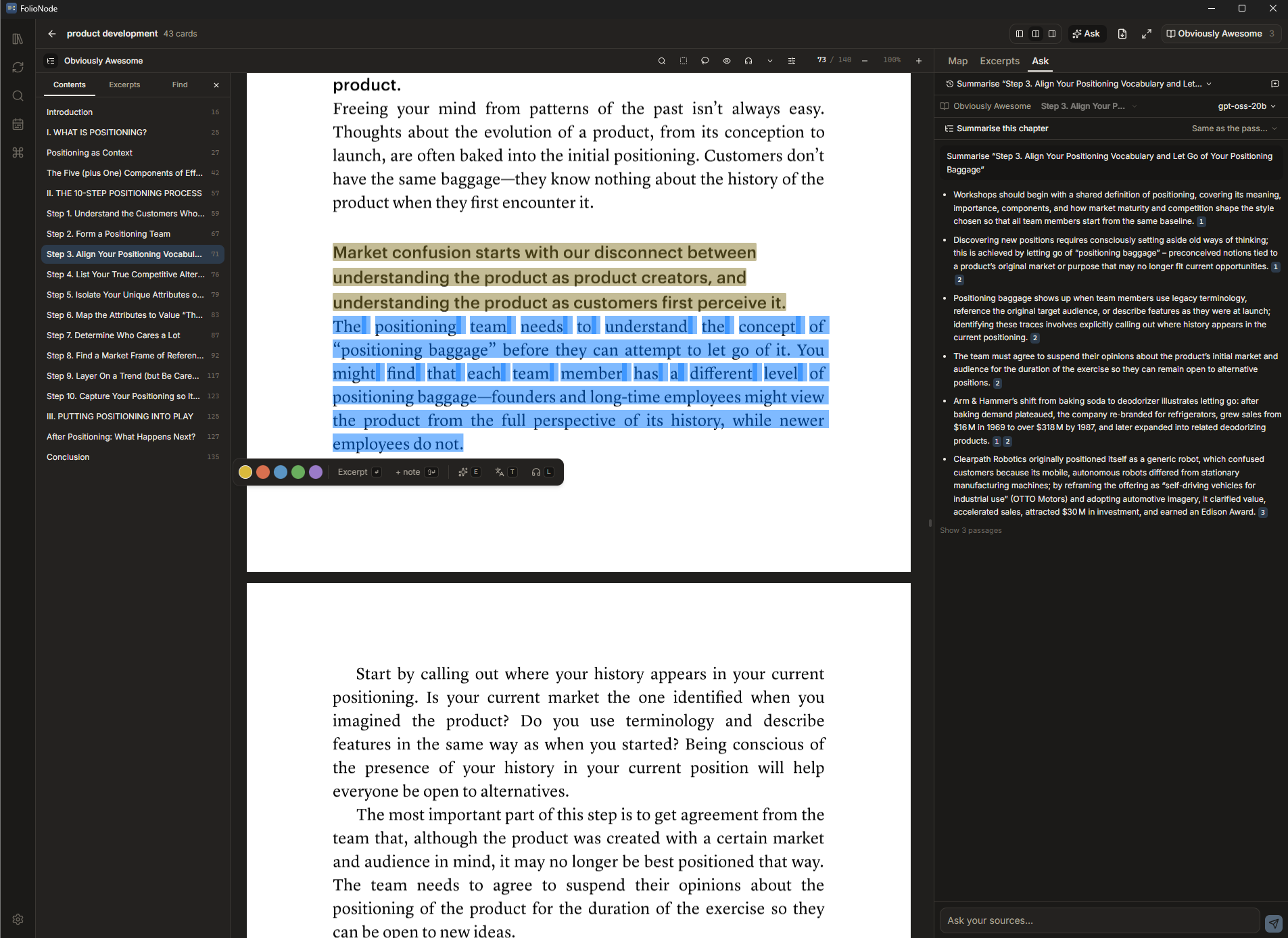
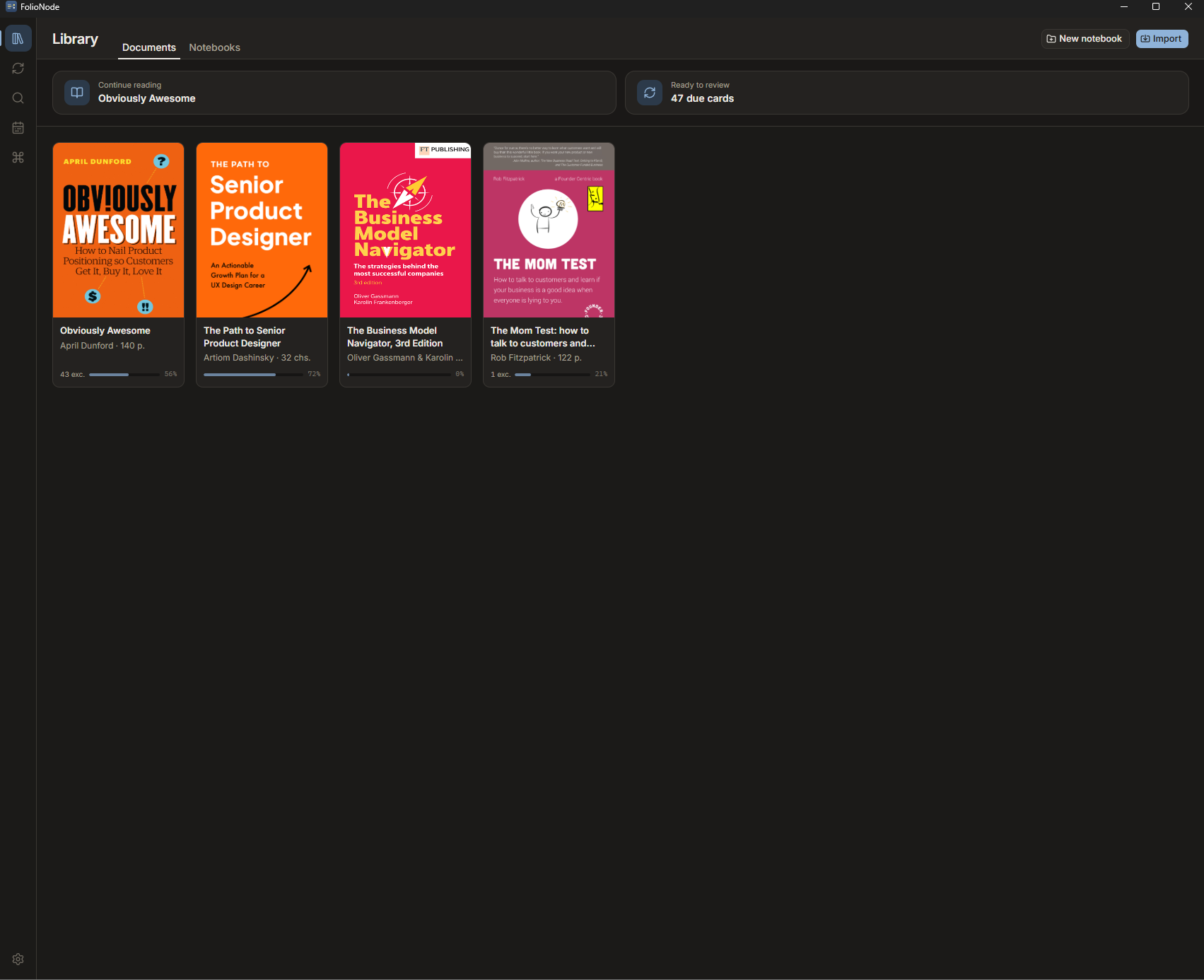
FolioNode is a desktop study workspace for PDFs and EPUBs. Every excerpt you take is three things at once — a highlight anchored in the source, a node on your mind map, and a flashcard in your review queue.
When a page resists, it can be read aloud in your system’s own voices, translated where it stands, or put to a model you choose — and what comes back is filed as that excerpt’s note, not left behind in a chat window.
v0.1.0 · 5.4 MB · free while in alpha · no account needed
- Read aloud
- Translate in place
- Ask your own copy
- Bring your own model
Native on Windows and on macOS, with your whole library in a file you own — no account, no cloud, no lock-in.
01The problem
Studying from a book costs four apps, two rounds of retyping and a chat log you will never open again.
Reading, structuring, remembering and asking are one activity, split across tools that do not talk to each other. Every handoff loses the same thing — the thread back to the page the idea came from.
- Step 1
A PDF reader
You highlight the passage that matters.
The highlight stays locked inside the file. Nothing you highlighted is ever reviewed again.
- Step 2
A notes app
You copy the passage over and write around it.
The link back to page 148 is gone. Six weeks later you cannot prove where the claim came from.
- Step 3
A flashcard app
You retype the passage a third time.
The card drifts from both the note and the source, so most people quietly stop making cards at all.
- Step 4
A chat window
You paste the paragraph in to have it translated, or explained in plainer words.
It answers about your paste, not about your book — and the answer stays in a chat log, with no page behind it and no chance of being reviewed.
FolioNode removes the handoffs. The excerpt is the unit of work — and so is everything you get back about it, down to the translation and the answer.
02The mechanic
One card. Three places it already lives.
There is no separate annotation, note and flashcard to keep in sync — because there is only one object. Everything else is a view of it, and everything you learn about a passage is filed on it: your own note, a translation, a model’s explanation.
“Positioning is a secret superpower that, when harnessed correctly, can change the way the world thinks about a problem, a technology or even an entire market.”
Note · kept from a translation
«Позиционирование — секретная суперсила: применённая правильно, она меняет то, как мир думает о проблеме, технологии и даже о целом рынке».
Projection 01
A highlight, anchored in the source
The excerpt keeps its exact position — the rectangle on a PDF page, the location in an EPUB. Your original file is never modified; annotations live in FolioNode's own database.
Projection 02
A node on the notebook map
It arrives on the map by itself. Drag it into a hierarchy, wrap related cards in a container group, draw cross-links between branches — the structure is yours to build.
Projection 03
A flashcard in the review queue
The same card is scheduled by FSRS, the modern spaced-repetition algorithm. Recall mode hides the passage until you have tried to remember it; one click jumps back to the page.
03The workspace
Five surfaces, one card model underneath.
Reading, collecting, structuring, reviewing and searching are different views of the same library — not different apps you have to reconcile.
A reader that stays out of the way
PDF and EPUB in the same window, with the notebook map docked beside the page whenever you want it.
- Contents, excerpts and in-page find sit in one sidebar — the same three, whether the book is a PDF or an EPUB.
- Selection rounds out to whole words, so a slightly short drag does not clip the first letter.
- Reading tone, typography and immersive mode, so long sessions stay comfortable.
- Reopen a book and you are back on the page you left, in the notebook you were working in.
04Assistance
Help that writes into your library, not into a chat log.
Three assists live inside the reader: listen to the page, translate or explain a passage where it stands, and ask the book itself. None of them is on by default, none of them is a subscription you are buying by installing the app — and what they give back can stay on the card it came from, with the page still behind it.
Listen, and still come back with excerpts
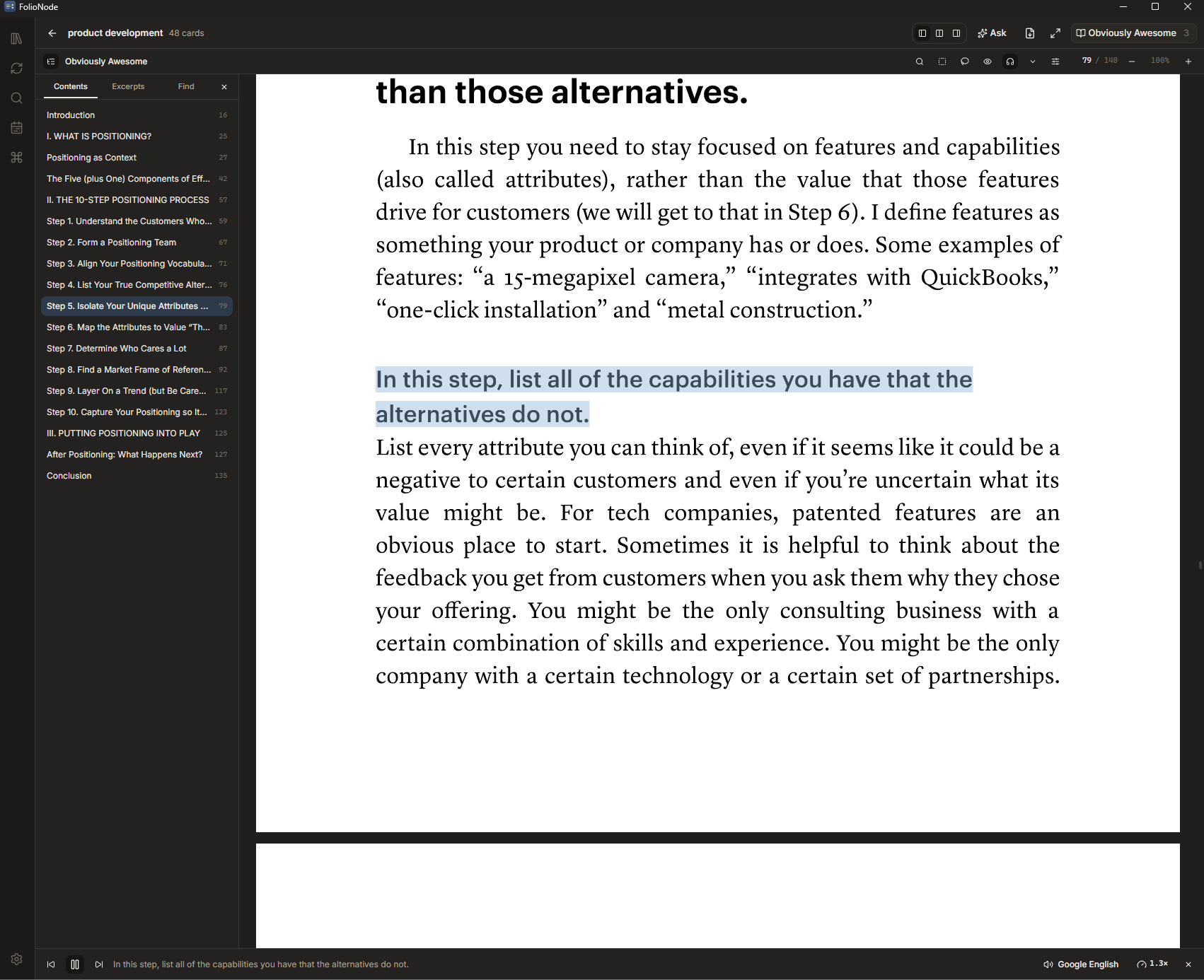
Get through a chapter while walking or cooking, pick the text back up exactly where the narration left it — and keep what struck you without stopping to type it.
- Offline by default: the voices already installed on your machine, no key and no network.
- On macOS those are the system voices themselves — including the Enhanced and Premium ones you downloaded, which a browser engine never hands over.
- Sentence by sentence, with the spoken sentence highlighted on the page and the page turning by itself.
- Press 1–5 while it reads and the sentence being spoken becomes a card in that marker colour — listening produces excerpts too.
- Start anywhere — the toolbar, “Listen from here” on a selection, or the keyboard. Better online voices are there behind a one-time notice.
Translate without leaving the page
Translation is an explicit action on a selection, never something that fires just because you highlighted a line. The source language is detected; the target one is your preference. Save it and the original stays as the excerpt while the translation is filed as its note — one card, both languages, on the map and in the review queue.
Explain or simplify a passage
Select a difficult paragraph and ask for it in plainer words. The model works only from the passage in front of it, and the result can be kept as the card’s note instead of evaporating when you close the popover.
Ask the book you are reading
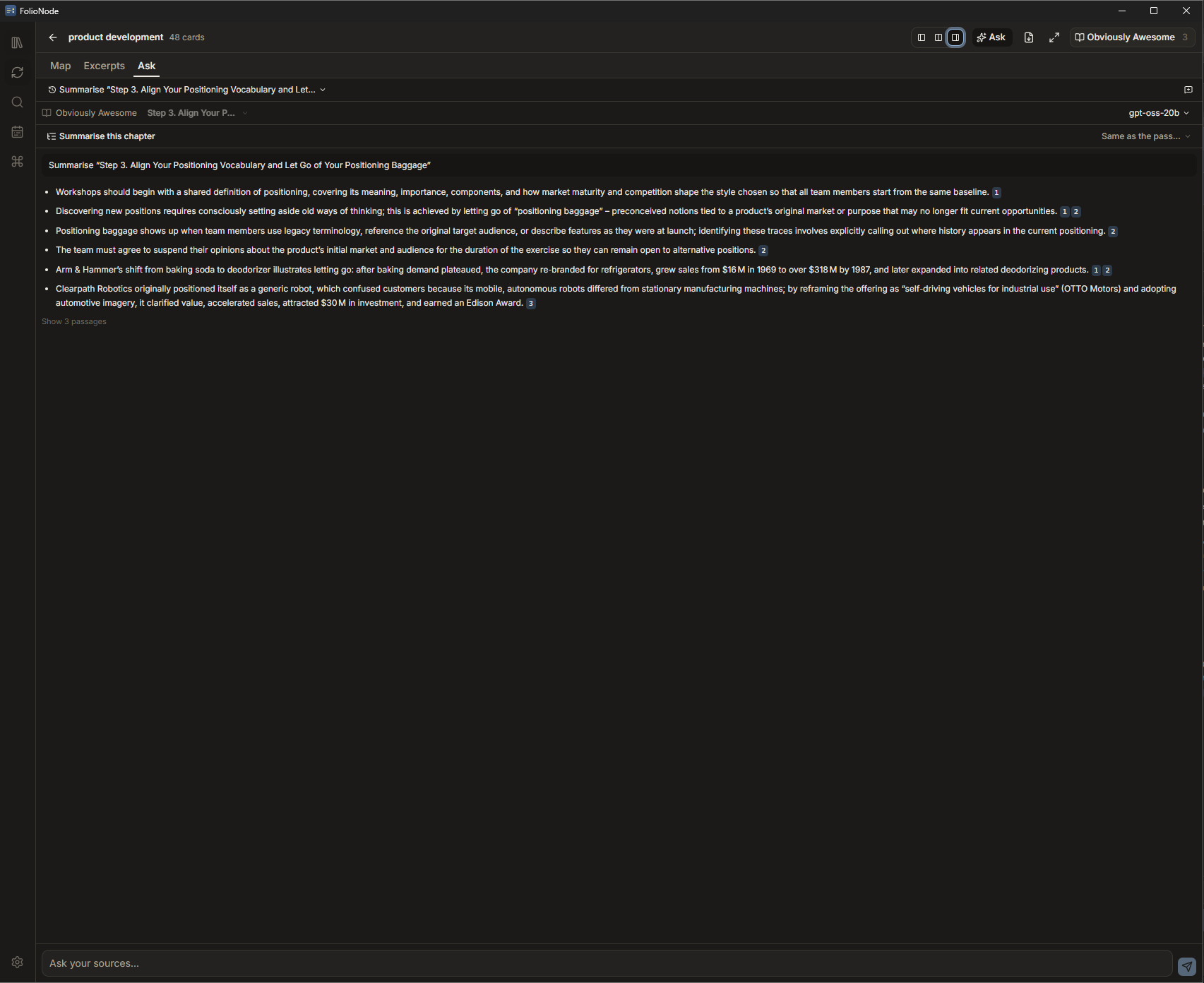
A book usually answers your question somewhere — two hundred pages from where you thought of it. Ask searches your own copy and answers from the passages it found, which is the difference between asking a model and asking the book.
- A conversation belongs to one book, so an answer can never quietly come from a different shelf.
- Ctrl+J opens Ask beside the page, next to Map and Excerpts; it names the source it is answering about, and the list follows the book you open.
- Retrieval is hybrid: keywords catch exact terms and numbers, embeddings catch the paraphrase you actually asked for.
- Passages that were neighbours in the book are merged before the model reads them, so an argument is not handed over cut in half.
- Every answer carries the passages it used, numbered — click one and land on the page it came from. An answer with no citations is labelled unsupported rather than dressed up.
Bring your own model
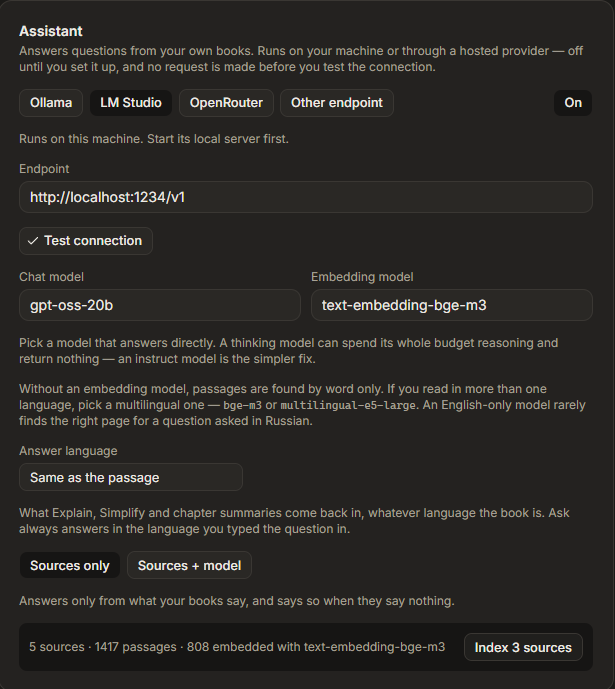
A study app is not a place to hand a library to a vendor by default. FolioNode ships no model and resells no tokens — you decide where the thinking happens, and nothing is metered by us because nothing passes through us.
- One protocol — OpenAI-compatible HTTP — for every provider. Presets for Ollama and LM Studio on your own machine, for OpenRouter, and for any other compatible endpoint.
- The model list is read from your endpoint — searchable, split into chat and embedding, priced per million tokens where the provider publishes it — so you pick from what is actually there.
- Your API key is held by the Rust core, write-only from the interface, and left out of the backup archive. Each provider preset keeps its own.
- Off until you set it up. No request is made — not even to localhost — before you enable it and a test connection succeeds.
- Answers stream as they are written, and stop when you tell them to.
What leaves your machine, and when
- With nothing configured
- Nothing. Reading, excerpting, mapping, review, search and offline read-aloud never make a network request.
- With a model configured
- A local model keeps every passage on your machine. A hosted one receives the passages retrieved for your question, and your question — nothing else from the library.
- Translation and online voices
- These use a public Google endpoint, so the selected text or the sentence being spoken goes to Google. Both are gated behind a one-time notice, and neither is the default.
05Where it stands
Familiar where it should be. Different where it counts.
Turning excerpts into a map and a review queue is not a new idea — it is the reason this kind of tool exists at all. What has been missing is a version that treats the desktop you already work on as its home, leaves the library in your hands, and lets the help you get with a hard page stay in that library instead of in someone else's chat history.
What needs no learning
- Excerpting straight from the page, by text selection or by region.
- Every excerpt landing on a notebook map you organise into a hierarchy.
- Container groups you move and resize as a unit.
- Reviewing those excerpts as flashcards on a spaced-repetition schedule.
- Jumping from a card back to the passage it was taken from.
- Having the page read to you, a passage translated, or a question answered about the book.
What is built differently
- Windows and macOS are both first-class, neither a port of the other — one native Tauri shell over a Rust core, with each platform's own keyboard and its own voices.
- Your library is one SQLite file on your own disk. Copy it, back it up, keep it.
- Source PDFs and EPUBs are never written to. Excerpts live in FolioNode's database, not in your files.
- AI is optional and unbundled: point it at a local model or your own provider key, or leave it off. No subscription, no tokens resold, nothing metered by us.
- The assists write into the library, not into a chat log — a translation or an explanation becomes that card's note, an answer cites the page and opens it.
- Answers come from your own copy of the book, retrieved from it and cited back to it, rather than from whatever a model remembers about the title.
Not there yet — worth knowing before you download
- Handwriting and ink annotations — out of scope for now.
- Cross-device sync — not built yet; the data model is designed not to preclude it.
- Cards and map branches generated from an answer — planned, not shipped.
- iOS and Android — desktop only.
06Ownership
Your library never has to leave your machine.
A reading tool accumulates years of your thinking. That is exactly the kind of data you should not have to rent access to.
- Local by default
- Documents, excerpts, maps, notes and review history live in a SQLite database on your machine. Nothing is uploaded to run the app — and with a model on your own machine, nothing is uploaded to think about it either.
- Your files stay untouched
- FolioNode reads your PDFs and EPUBs and never writes back to them. Delete the app and your library is exactly as it was.
- Backup you can actually hold
- Export the whole library to a single archive and restore it on another machine. No proprietary cloud in the middle.
- No bundled services
- No model is shipped, no tokens are resold and no account is created. The assistive features run on a model you point them at — local or your own key — or not at all, and nothing about them is metered by us.
07Download
Get the alpha.
Free while FolioNode is in alpha. No account, no licence key, and nothing phoned home from the app itself. This site counts downloads — which build, when, and roughly where from — and keeps no IP address or raw user agent.
Windows
Windows 10 or 11 · 64-bit
- Version
- v0.1.0
- Size
- 5.4 MB
- Published
- Aug 4, 2026
- Package
- NSIS installer (.exe)
- Signature
- Not signed yet
SHA-256 9873296bdd190324e64eb4b670351ebd827a355a65fc492d18c596ecb991c333
macOS
macOS 11 Big Sur or later · Apple Silicon and Intel
- Version
- v0.1.0
- Size
- 14.9 MB
- Published
- Aug 4, 2026
- Package
- Universal disk image (.dmg)
- Signature
- Developer ID, notarised
SHA-256 143a99faa11b551a4f7a86a5da18e3b5c5a5165772df6398ac94df77f4230989
Alpha means the feature set is complete enough to study with every day, and the rough edges are real. The macOS image is signed and notarised, so it opens by double-clicking; the Windows installer is not signed yet, so SmartScreen warns you on first launch.
08Questions
The things worth knowing first.
You already read enough. Keep more of it.
v0.1.0 · 5.4 MB · free while in alpha · no account needed